Troubleshoot login issues
If you are having trouble logging into DocMX, check the common issues below. Incorrect time on your device If the time on your device is incorrect by more than 1 minute, the login will fail. Check for…
If you are having trouble logging into DocMX, check the common issues below.
Incorrect time on your device
If the time on your device is incorrect by more than 1 minute, the login will fail.
Check for time difference
Go to https://time.is/ to see if the time on your device is correct.
Go to the next step if the time is incorrect by more than 1 minute.Depending on your Operating system, follow the below instructions to synchronise the time on your device:
How to synchronise the time – Windows 10
Press the Windows key + I (letter i) button simultaneously on the keyboard to launch the Windows Settings menu.
Select ‘Time & Language’.
In the ‘Date & Time’ section, navigate to scroll down to the ‘Synchronise your clock’ sub-section and press the ‘Sync now’ button.
That will immediately sync your computer’s clock with the Microsoft time server (usually takes 2 – 5 seconds).
How to synchronise the time – Mac
Follow the instructions as detailed on Apple Support: Mac Instructions
Clearing Site Cookies
You may have invalid or incorrect cookies stored in your browser session. You can clear just the cookies stored for DocMX quickly and easily. Expand the section below related to your browser, and follow listed steps.
Edge
1. Navigate to your Login Screen.
2. Click the Lock icon in the Address bar.
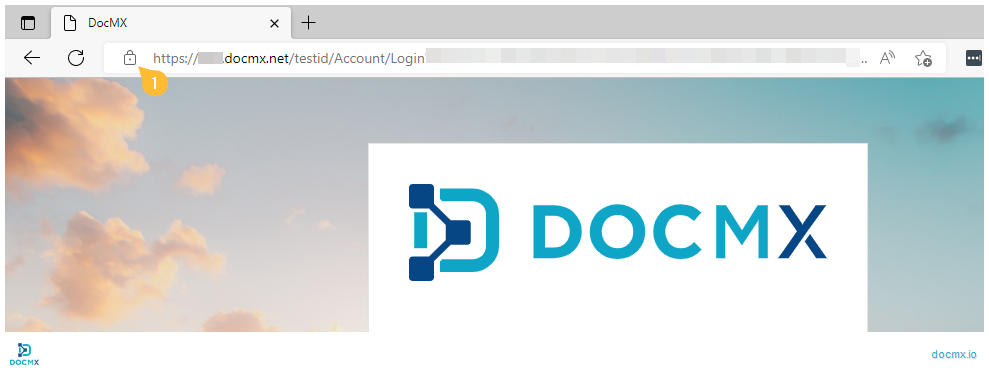
3. Click “Cookies”.
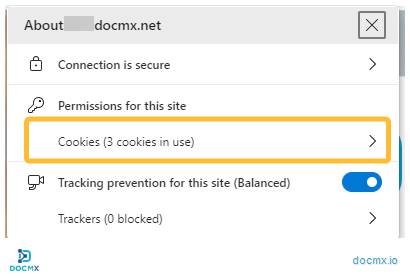
4. Select the cookies at the docmx.net domains, then click Remove. Once the cookies have been removed. Click “Done”.
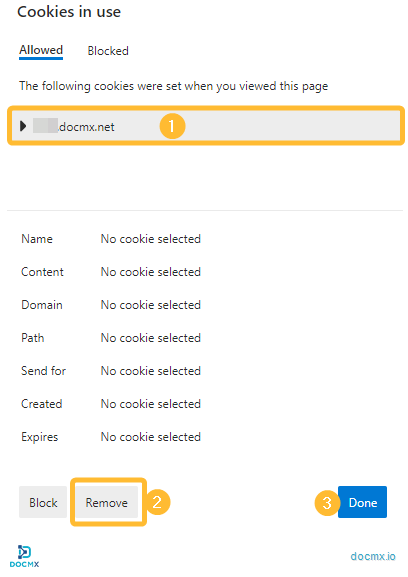
5. Your Cookies have been cleared, and you can try to login again.
Chrome
1. Navigate to your Login Screen.
2. Click the Lock icon in the Address bar.
3. Click “Cookies”.
4. Select the cookies at the docmx.net domains, then click Remove. Once the cookies have been removed. Click “Done”.
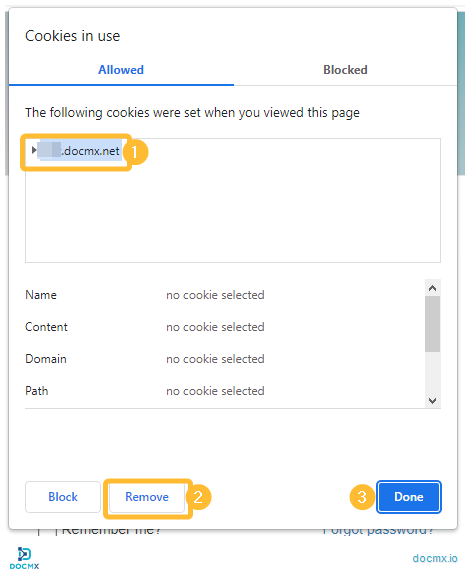
5. Your Cookies have been cleared, and you can try to login again.