Understand roles & permissions
How do roles and permissions affect a user’s access to a document type?
Security roles
Every user in DocMX has a role or multiple roles. Each role has different levels of permissions, and they determine whether a user has:
Access to a location
A location could be the organisation as a whole, or a department like “Human Resources”. This is important as documents are placed inside locations and roles act as a key to enter the locations.Access to a document type
Having access to a location is halfway there. Once users are inside a location, they also need a role that will act as a key to open the document type.
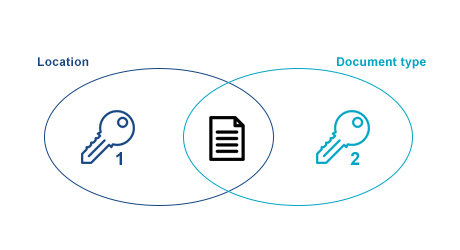
2 keys are required to open a document
A user can only access a document if the user has access to both the location and document type.
Other roles
Approval
Users with approval roles receive tasks as part of the workflow process.
Non-approval
Non-approval roles allow users to view documents.
Form
Form roles allow users to complete forms.
Permissions on a location
Locations in DocMX can be seen as the different sections, departments or entities of an organisation. Users can only access a location if they have a role that allows them to do so.
Examples of Locations
By department
An organisation may have many different departments which can be considered as locations. The company is also considered to be a location.
Company access
All users are given a role to access the company location. This is the same as walking into the company building.Department access
Users are only given access to locations/departments required for their job.
Company | Accounts | Kitchen | Sales | |
|---|---|---|---|---|
Director of Finance | ✓ | ✓ | ✓ | ✓ |
Accountant | ✓ | ✓ | ||
Head of Kitchen | ✓ | ✓ | ||
Sales Director | ✓ | ✓ |
By entity
An organisation may have many entities, and they will also have different departments.
Entity access
All users are given a role to access the entity where they work.Regional access
A regional director may be given access to roles across multiple entities.
Entity 1 | E1 | Entity 2 | E2 | |
|---|---|---|---|---|
E1 Director of Sales | ✓ | ✓ | ✓ | |
E2 Director of Sales | ✓ | ✓ | ||
Regional Director of Sales | ✓ | ✓ | ✓ | ✓ |
Permissions on a document type
A role may be granted up to four permissions on a document type:
View
Add
Edit
Delete
Examples
View | Add | Edit | Delete | |
|---|---|---|---|---|
Basic-level user | ✓ | ✓ | ||
Mid-level user | ✓ | ✓ | ✓ | |
High-level user | ✓ | ✓ | ✓ | ✓ |
Basic-level user
This user may have a role with “view” and “add” rights for invoices. This will allow the user to search for invoices and index them to the system.Mid-level user
This user may have a role with “view”, “add” and “edit” rights for invoices. This will allow the user to do the same as the basic-level user, but can also edit invoices.High-level user
This user may have a role with “view”, “add”, “edit” and “delete” rights for invoices. This will allow the user to do the same as the mid-level user, but can also delete invoices.
The above examples assume the users also have a role that has permission to access the location of the invoices.